November 18, 2015 • qnib • 2 min read
Docker networking 101
In this post we will spin up a kvstore holding Consul and connect two distinct docker-machines to the Consul cluster to share the networking configuration.
Checkout the repository
The stack is available on github to provide the files needed.
$ git clone https://github.com/ChristianKniep/orchestra.git
$ cd orchestra/docker-networking/
$ ls
consul.yml
$
Bootstrap KV store
$ docker-machine create -d virtualbox kvstore
INFO[0000] Creating SSH key...
*snip*
$ eval "$(docker-machine env kvstore)"
kvstore $
Create the initial Consul server
kvstore $ docker-compose up -d
Creating consul
kvstore $ docker ps
NAMES               IMAGE                             COMMAND                  PORTS
consul        192.168.99.101:5000/qnib/consul   "/opt/qnib/bin/start_"   0.0.0.0:8500->8500/tcp
kvstore $
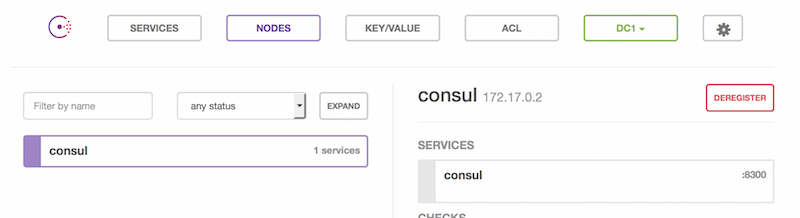
The Consul WebUI will appear under the address of the kvstore and port :8500.
Spin up two docker-machine and configure the network backend
First create the machines…
machine create -d virtualbox mh0
machine create -d virtualbox mh1
Afterwards log into the nodes and configure the --cluster-store.
$ docker-machine ssh mh0 # and mh1
docker@mh0:~$ cat /var/lib/boot2docker/profile

EXTRA_ARGS='
--label provider=virtualbox
--cluster-store=consul://192.168.99.101:8500/network --cluster-advertise=eth1:2376

'
To put this to work, the machines have to be restarted.
$ docker-machine restart mho mh1
$
Create the network
When they are up and running a network, created on one node is available on both… :)
$ eval "$(docker-machine env mh0)"
mh0 $ docker network create -d overlay global
b68aa47fbccf99a31c18f12ff88ac6a0b484eb3fae46098ef56a76c3ccd8bf02
mh0 $ docker network ls
NETWORK ID          NAME                DRIVER
b68aa47fbccf        global              overlay
60ec1a41a63e        host                host
3baa42ec2939        bridge              bridge
80d8c6456468        none                null
$ eval "$(docker-machine env mh1)"
mh1 $ docker network ls
NETWORK ID          NAME                DRIVER
b68aa47fbccf        global              overlay
ec68ec21a55f        none                null
3911cebcb0df        host                host
0f66b80ffe57        bridge              bridge
As we can see, the local networks none, host and bridge have different IDs, whereas the global one has the same.
Run containers
Start u0 on the first machine.
mh0 $ docker run -ti --net=global --name=u0 --hostname=u0  ubuntu  bash
root@u0:/# ip -o -4 addr
1: lo    inet 127.0.0.1/8 scope host lo\       valid_lft forever preferred_lft forever
13: eth0    inet 10.0.0.2/24 scope global eth0\       valid_lft forever preferred_lft forever
15: eth1    inet 172.18.0.2/16 scope global eth1\       valid_lft forever preferred_lft forever
root@u0:/#
u1 on the second.
mh1 $ docker run -ti --net=global --name=u1 --hostname=u1 ubuntu  bash
root@u1:/# ip -o -4 addr
1: lo    inet 127.0.0.1/8 scope host lo\       valid_lft forever preferred_lft forever
7: eth0    inet 10.0.0.3/24 scope global eth0\       valid_lft forever preferred_lft forever
10: eth1    inet 172.18.0.2/16 scope global eth1\       valid_lft forever preferred_lft forever
root@u1:/#
Now we can ping the IP of u0 from u1:
root@u1:/# ping -c1 10.0.0.2 | grep trans
1 packets transmitted, 1 received, 0% packet loss, time 0ms
root@u1:/#